Keyframe Interpolation
Each keyframe sets a property value at some point of time during a clip. The way that the property value changes between any two keyframes is called the “interpolation type”.
OpenShot offers 3 interpolation types, which are shown on the following diagrams where the property value rises from the bottom to the top, as time progresses from left to right:

Important: the interpolation type between two keyframes is set in the properties for the second keyframe.
Linear interpolation type
 The property value varies linearly with time from the old value to the new value.

Constant interpolation type
 The property value stays constant at the old value, then changes instantly to the new value at the keyframe.

Bezier interpolation type
 The property value varies on a cubic bezier curve from the old value to the new value.
Over twenty types of cubic bezier curves are available, as listed below. Most names indicate the type of curve that is being approximated – however, simply looking at the graphs is probably more help.


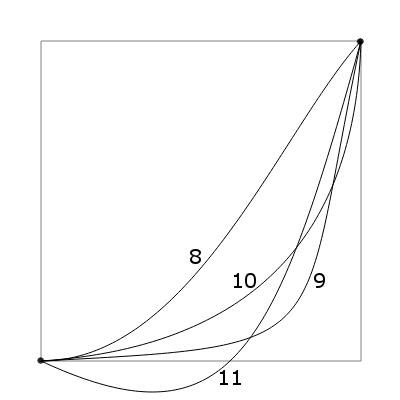
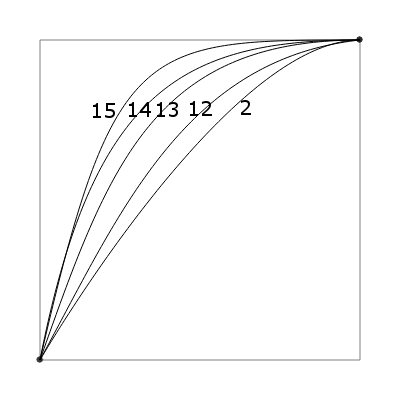


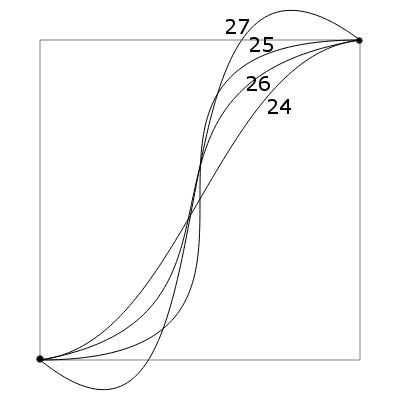
Specific choices of bezier curve that are helpful when doing audio fades and crossfades are discussed in the appendix on Audio Fades.
If no keyframe for a property has been set at the start of the clip, the first keyframe determines the property’s constant value from the start to that first keyframe. Similarly if no keyframe is set at the end of the clip, the value at the final keyframe remains constant until the end of the clip.
Note that the interpolation type for the very first keyframe has no effect, even though it can be set. This is because the interpolation type applies to the preceding section of the curve.